Japanese Ramen Simulator: System Requirements & Performance
Compare official minimum and recommended Windows specifications and use a measured checklist for crashes, FSR and performance issues.
Official Windows requirements
The following specifications come from the current Steam store page. The developer names processor families without generations, so we do not silently replace them with particular CPU models.
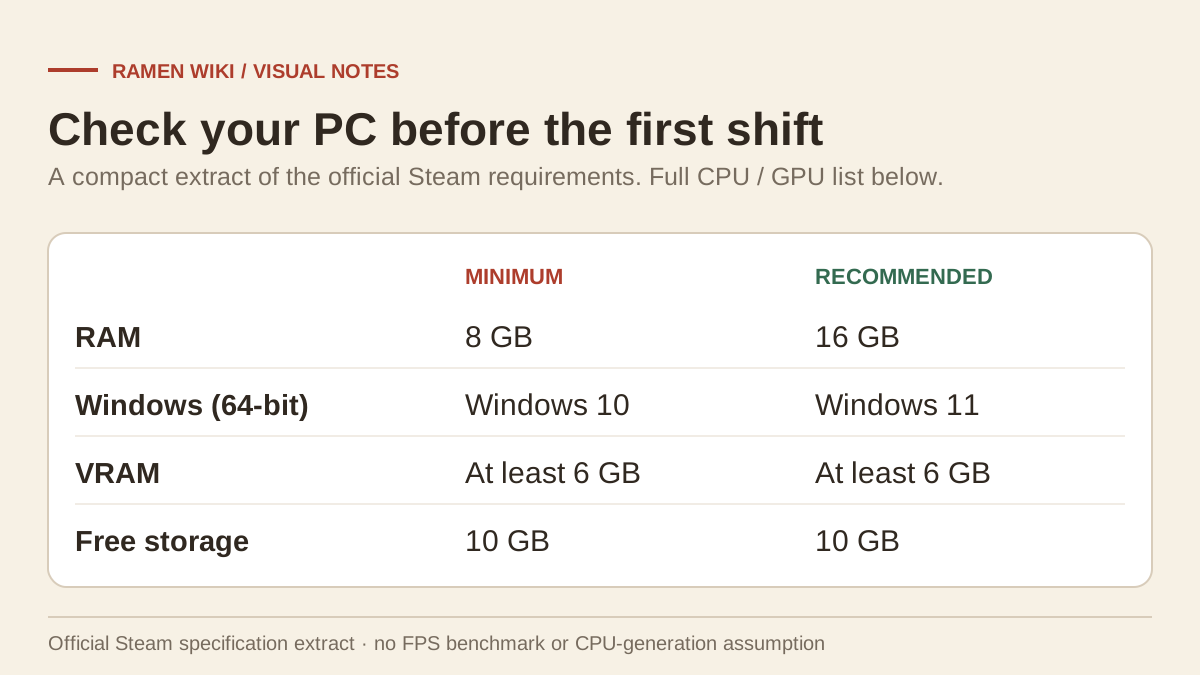
| Component | Minimum | Recommended |
|---|---|---|
| Operating system | Windows 10, 64-bit | Windows 11, 64-bit |
| Processor | Intel Core i5 | Intel Core i7 |
| Memory | 8 GB RAM | 16 GB RAM |
| Graphics | NVIDIA GTX 1060 / AMD RX 580; at least 6 GB VRAM listed | NVIDIA GTX 1660 / AMD R9 390X; at least 6 GB VRAM listed |
| DirectX | Version 11 | Version 12 |
| Network | Broadband internet connection | Broadband internet connection |
| Storage | 10 GB available space | 10 GB available space |
This table reproduces the requirements as published, including the stated VRAM line. It does not certify every variant of a listed card. Check your actual hardware rather than treating a family name as a performance benchmark.
The platform and release reference covers native operating-system support and the current Early Access release.
No verified FPS table
We have not run the game on a local test machine. There are no measured 1080p or 4K frame-rate results in this guide. Minimum and recommended specifications do not establish a target resolution, preset or frame rate.
A useful comparison is to note your CPU model, GPU and VRAM, installed RAM, operating system and available storage. If one component differs from the published requirements, that is a reason to investigate; it is not a predicted number of frames per second.
Crash checks in a sensible order
The Day 1 patch fixes issues involving FSR initialization and frame-generation crashes. Confirm the installed game version before comparing your problem with an older report.
The following checklist is general troubleshooting advice, not a tested cure:
- Let Steam complete pending game updates.
- Restart the game after an update has finished.
- Verify installed game files through Steam if the installation may be damaged.
- Check available storage and compare the machine with the official specifications.
- Use a current appropriate graphics driver from the GPU vendor.
- If the game opens, change one available graphics option at a time and record the result.
- Save the exact crash or error wording before contacting support.
Do not add guessed Unreal configuration edits or launch flags just because another game uses them. We have not verified that a particular DirectX flag or ini variable is supported here.
Separate graphics trouble from controls
A difficult camera perspective, unreadable HUD and low performance can feel similar during a busy shift, but require different checks. The controls and language guide covers the confirmed camera options, partial controller support and HUD scaling.
The launch discussion about missing graphics options includes a request concerning chromatic aberration. It does not provide a verified setting or configuration-file solution. This wiki therefore does not advertise one.
Information to include in a report
Record the numerical game version, operating system, CPU, GPU and RAM. Explain whether the crash occurs on launch, when loading a shop or after changing an option. Include the exact error text and whether the problem reproduces without the last change.
For an online-session error, use the connection guide instead of assuming it is a GPU fault. For future graphics fixes, check the patch tracker: a new announcement may narrow the problem, but an old fixed-issue entry does not guarantee that all crashes share that cause.
Related Articles
guides
Japanese Ramen Simulator: All 18 Achievements & Requirements
Browse all 18 Steam achievements, their published requirements and related cooking, boss, customization and shop-level milestones.
guides
Japanese Ramen Simulator: Beginner Guide
Start your first ramen shift with a practical preparation, cooking and service checklist, plus verified tutorial changes from the launch patch.
guides
Japanese Ramen Simulator: Controls, Language & Cart Settings
Check confirmed controls, interface languages, controller limits and cart changes, with careful steps for launch-day input and language problems.
Was this helpful?
Thanks for the feedback!